
Orbot: Tor for Android
The Tor ProjectCommunication
4.08.44K Reviews
- Version
- 17.9.5-RC-4-tor-0.4.9.11
- Installs
- 10.00M
- Age Rating
- Everyone
Screenshots
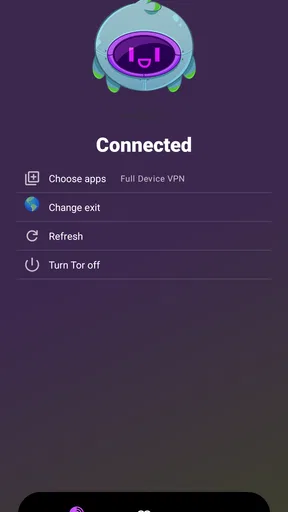
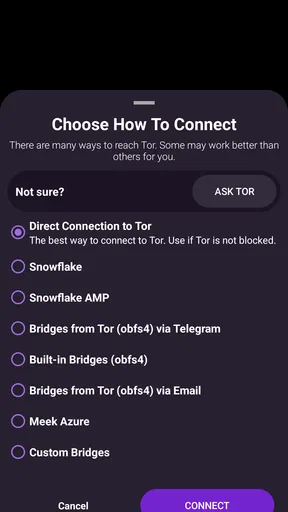
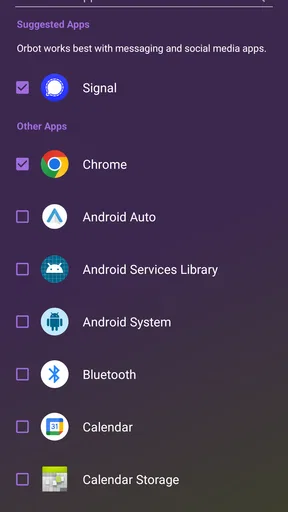
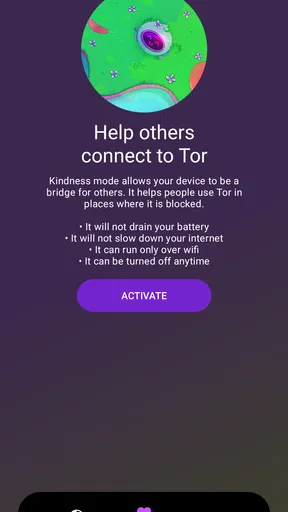
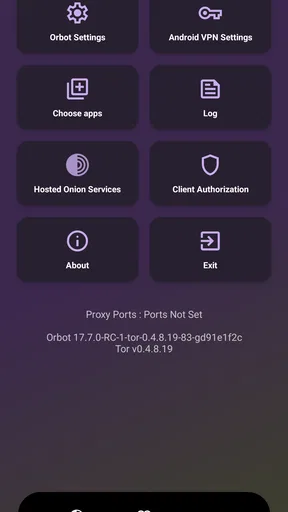
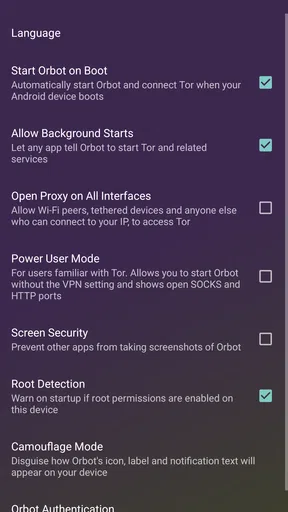
Our Review of Orbot: Tor for Android
 Analysis by Appyee
I opened Orbot: Tor for Android with a simple question: what happens when I want more privacy on my phone without replacing every app I use? That is the practical appeal of this communication app from The Tor Project. It is free, aimed at everyone, and built around routing selected Android traffic through the Tor network rather than treating ordinary browsing as private by default.
My experience was less about pressing one button and becoming invisible, and more about learning which parts of my phone actually benefit from Tor. That distinction matters. Orbot can be a useful privacy tool, especially when I am using an unfamiliar network or need to reach a service that is blocked locally. It is not a universal shield, and it does not turn careless account use into anonymous communication.
From an ordinary connection to a more private route
The starting condition is familiar: I am connected to a café network, travelling, or simply uncomfortable with sending every request directly from my device. I install Orbot, start it, and choose how much of my phone should use the Tor connection. The app’s purpose is straightforward, but the useful part is the control behind that first connection.
Orbot is listed in the Communication category, although I would describe it more precisely as a privacy and traffic-routing tool. The developer is The Tor Project, the organization associated with the Tor network and its privacy-focused software. The app has been available since August 13, 2010, and its long presence helps explain why it feels more like a specialized utility than a polished social app.
The current release is version 17.9.5-RC-4-tor-0.4.9.11, and it works on Android 7.0 or later. That minimum requirement is fairly approachable for older phones, though the exact behavior can still depend on Android’s network handling and on whether another application cooperates with the routing method Orbot needs.
Before relying on it, I would decide what I am trying to protect. If my goal is to stop a local network operator from seeing the destinations I contact, Tor may help. If my goal is to hide my identity from a website where I sign in with my normal account, the result is much weaker. The website may not see my usual network address, but it can still know who I am from the account, cookies, device behavior, or information I voluntarily provide.
Choosing the right scope instead of routing everything blindly
The first useful decision is whether to route individual applications or use Orbot more broadly. For a quick test, I prefer starting with one privacy-sensitive browser or communication tool. This keeps the outcome understandable and avoids unexpectedly slowing down maps, streaming, banking, or background services that do not need Tor.
A broader route can make sense when I want a consistent privacy posture across several compatible apps. However, it also creates more friction. Some apps may fail to connect, reject Tor exit addresses, or behave strangely when their network location changes. A selective setup is usually easier to troubleshoot because I can identify which app caused the problem.
This is one of the less obvious strengths of Orbot: it encourages me to think in terms of traffic boundaries. I do not have to make a dramatic all-or-nothing change. I can begin with a single task, compare the behavior, and expand only when the trade-off feels acceptable.
What the connection feels like in daily use
Once the Tor route is active, the main difference is not a flashy interface. It is the altered path between an app and the internet. Requests pass through multiple relays before reaching their destination, which is why pages and connections can feel slower than they do on a normal mobile or Wi-Fi route.
For text-heavy browsing, reading, research, or occasional access to a blocked service, that delay can be tolerable. For video calls, live games, large downloads, or anything that depends on quick and stable responses, I would not make Tor my default connection. The privacy benefit has to justify the extra waiting and the possibility of a connection being refused.
I also found that the result depends on the application itself. A browser designed with privacy in mind may behave sensibly, while an ordinary app may reveal identifying details through its own login system or embedded services. Orbot changes the network path; it does not rewrite the privacy design of every application installed on the phone.
A realistic workflow: checking a blocked article on public Wi-Fi
Here is the kind of everyday situation where I find it most useful. I am working from a public Wi-Fi network and want to read an article or reach a service that is unavailable on that connection. I open Orbot, select the browser I intend to use, start the Tor connection, and then load the page.
If the page opens, I check whether important functions still work. A static article may be fine, while sign-in, media playback, or interactive forms may fail. I avoid entering sensitive credentials simply because the page is now reachable. Tor can change the route, but it does not make a suspicious website trustworthy.
When I finish, I stop the connection or return the browser to its normal route. That last handoff is easy to overlook. Leaving a privacy route active may affect later browsing, make other services appear to come from a different region, or create confusion when an app suddenly asks for another verification step.
This workflow shows Orbot’s strongest practical role: it is a switchable layer for a specific job. I use it when the destination or network creates a privacy problem, not automatically for every minute of the day.
Handoffs between Orbot, Android, and other apps
The important handoff is between Orbot and the application carrying the actual conversation or browsing session. Orbot does not replace that app. I still need a browser, messaging client, or other compatible tool, and that tool still controls its own account, storage, notifications, and content.
That separation is both useful and confusing. It means I can keep my normal apps while applying Tor where it matters. It also means a connection problem may originate outside Orbot. If a service blocks Tor traffic, changing settings inside Orbot may not solve it. If an app ignores the route or uses a separate connection method, Orbot cannot guarantee that all of its traffic follows the path I expect.
Another handoff occurs when I move from a Tor-routed browser to a normal browser. The two sessions should be treated as separate privacy contexts. I would not assume that opening the same account in both places keeps the identities separate. In practice, account behavior can connect activity even when the network paths differ.
For that reason, I prefer a simple routine: use a dedicated browser session for Tor tasks, avoid mixing personal accounts into anonymous research, and close or clear the session according to my own privacy needs. Orbot makes the route available, but disciplined separation makes the route meaningful.
What the outcome is—and what it is not
The immediate outcome is a connection that can conceal my usual network location from the destination and help me get around some network-level restrictions. That is valuable when I need an additional privacy layer or when a local firewall prevents access to a legitimate service.
But I would never describe the result as complete anonymity. Tor has limits, and the user can defeat the benefit by logging into a personal account, sharing identifying details, installing unsafe software, or using an application that exposes information through its own design. The safest way to view Orbot is as one part of a privacy workflow, not as permission to ignore every other warning sign.
The app’s public reception suggests that many people find this purpose worthwhile. It holds a 4.0 average from around 197 thousand ratings, with roughly 8.4 thousand written reviews, and it has passed 10 million installs. Those figures do not remove the learning curve, but they do show that Orbot is not an obscure experiment used only by technical specialists.
I also appreciate that the price is free. That makes it easier to try without committing money, which is important because the right setup depends heavily on personal needs and on the behavior of the apps I use. The content rating is Everyone, so the barrier is not age-related; the real barrier is understanding what Tor can and cannot do.
Where the flow breaks
The first break is speed. Tor is designed around privacy, not maximum throughput. A page that loads instantly on a normal connection may take noticeably longer, and a service that depends on rapid back-and-forth communication may become frustrating. I would skip Orbot for competitive gaming, routine video meetings, and time-sensitive work unless I had a specific reason to accept the delay.
The second break is compatibility. Some websites and apps treat Tor traffic as suspicious, require extra verification, or refuse the connection completely. That can be especially annoying when I am trying to complete a simple task and the service assumes that a changing network location means account abuse.
The third break is user misunderstanding. A person may start Orbot, open a normal app, and assume every private detail is protected. That assumption is too broad. The app’s value depends on selecting the right traffic and understanding whether the destination can identify me through a login or another signal.
There is also a practical troubleshooting cost. When an app stops working, I need to test whether the issue is caused by Tor, the app’s own servers, Android’s network state, or the network I am currently using. Selective routing reduces this problem, but it does not eliminate it.
How it compares with a conventional VPN
A conventional VPN is often easier for everyday use. I usually install it, connect once, and allow most phone traffic to follow the same encrypted tunnel. That can be a better choice when I need stable performance, a predictable location, or broad coverage with minimal configuration.
Orbot is more appealing when I value Tor’s multi-relay design, want to route only selected applications, or need a tool focused on resisting local blocking. The trade-off is greater latency and a higher chance that services will challenge or reject the connection. A VPN generally asks me to trust the VPN provider; Tor shifts the privacy model toward a distributed network, but it does not solve application-level identification.
I would not choose between them based on the word “privacy” alone. For fast work on a hotel network, a reputable VPN may be less disruptive. For sensitive research where I want to avoid sending traffic directly through the local network and can tolerate slower browsing, Orbot may be the more appropriate tool.
Who should use it and who should skip it
I recommend Orbot to people who are willing to make deliberate choices about their traffic. It suits privacy-conscious researchers, travelers dealing with restrictive networks, and Android users who want a Tor route available without replacing their entire phone setup.
It is also useful for someone who wants to learn how privacy tools behave in real conditions. Starting with one browser and one task provides a practical lesson in the difference between network privacy and identity privacy.
I would skip it if my priority is effortless speed. I would also avoid making it the main connection for services that depend on low latency, location accuracy, or reliable account verification. Families looking for a simple safety app may find the concept too specialized, while users who only want to hide their traffic from a local Wi-Fi operator may prefer a conventional VPN because it requires less explanation.
My recommendation after using the complete workflow
My final view is positive, with a clear condition: Orbot works best when I treat it as a precise privacy instrument rather than a magic invisibility button. The flow is simple enough to begin—start the app, choose the traffic, perform the task, check the result, and return to normal routing—but the decisions around that flow determine whether it actually helps.
The most useful habit is to start small. Route one compatible app, test a low-risk task, note the speed and whether the service accepts the connection, then decide if broader use is worthwhile. Keep personal accounts separate from privacy-sensitive browsing, and remember that the destination can still recognize behavior that the network route does not hide.
For me, that balance makes Orbot worth keeping on an Android phone. It is free, available for Everyone, and maintained by The Tor Project, but its real value is not convenience. It gives me an option when the ordinary route feels too exposed or when a network blocks something I need. If I accept the slower connections and occasional compatibility problems, it becomes a thoughtful addition to my privacy toolkit rather than an app I expect to solve every problem.
Verdict
Strengths of Orbot: Tor for Android
- Routes traffic through Tor to improve privacy and anonymity.
- Supports per-app VPN routing for precise control over protected apps.
- Open-source code allows public inspection and community contributions.
- Includes bridges to help connect when Tor access is blocked.
- Can protect apps without requiring root access on Android devices.
Limitations of Orbot: Tor for Android
- Connection speeds can be noticeably slower than a regular VPN.
- Some websites may block Tor exit-node traffic or trigger extra verification.
- Certain apps may malfunction when routed through Tor.
- Initial setup can be confusing for users unfamiliar with Tor networking.
- Battery and data usage may increase during extended background operation.
Similar Picks in This Category
View All
Google Messages
Google LLC4.6

Gmail
Google LLC4.1

Google Meet
Google LLC4.4

Google Chrome
Google LLC4.1

WhatsApp Messenger
WhatsApp LLC4.6

Carrier Services
Google LLC4.2
Frequently Asked Questions
What is Orbot: Tor for Android, and what does it do?
Orbot is an Android application that connects your device to the Tor network, helping route supported internet traffic through several volunteer-operated relays. This process is designed to hide your IP address and make it harder for websites, advertisers, or network observers to identify your approximate location and browsing origin. It is primarily a privacy tool, not a complete replacement for every security measure on your phone.
Does Orbot protect all apps and all internet traffic automatically?
Not necessarily. Orbot’s coverage depends on how it is configured and whether an app supports its connection methods. Some Android versions and applications may require you to select specific apps for Tor routing, while others may ignore proxy settings or use separate connection technologies. After installation, review Orbot’s settings and test the apps you intend to protect instead of assuming that every connection is automatically routed through Tor.
Will Orbot make my internet connection slower?
In most cases, yes. Tor traffic passes through multiple relays, which improves anonymity but usually increases latency and reduces connection speed compared with a normal direct connection. Browsing, messaging, and lightweight services may remain usable, although video streaming, downloads, online gaming, and other bandwidth-intensive activities can feel noticeably slower. Performance also varies according to network conditions and available Tor relays.
Is Orbot a VPN, and can it replace a VPN application?
Orbot and a traditional VPN provide privacy in different ways. Orbot routes traffic through the decentralized Tor network, while a VPN generally sends traffic through servers operated by one provider. Orbot can be useful when anonymity and resistance to centralized tracking are priorities, but it may be slower and may not work with every app. Neither tool makes you completely anonymous, and each has different advantages and limitations.
Are there any important limitations or risks to know before downloading Orbot?
Orbot can improve privacy, but it does not protect you from phishing, malware, insecure accounts, or information you voluntarily reveal online. Websites may still identify you through logins, browser fingerprinting, cookies, or personal details. Some services block Tor connections or require additional verification, and certain apps may not function correctly. Download Orbot from a trustworthy source, keep it updated, and avoid installing unknown add-ons or configuration files.
